顯示具有 java 標籤的文章。 顯示所有文章

2010年4月20日 星期二

J2ME Wireless Toolkit GPS (jsr179)

Target: GPS application
Design Flow: 1. 利用 J2ME Wireless Toolkit (JSR179),取得經緯度位置, La = get Latitude(); //取得緯度 Ln = get Longitude(); //取得經度 2.在用Html request的方式透過http://tinygeocoder.com/create-api.php?g=”+lat+”,”+lon,取得我們易懂的位置. La = 33.790348 Ln = 117.226085 example: http://tinygeocoder.com/create-api.php?g=33.790348,-117.226085 3. 最後可以結合 Google Map Display. Flow Chart Sample Code: Get La,Ln
        Coordinates c;
        // Set criteria for selecting a location provider:
        // accurate to 500 meters horizontally
        Criteria cr= new Criteria();
        cr.setHorizontalAccuracy(5000);
        cr.setVerticalAccuracy(5000);
    // Get an instance of the provider
        lp= LocationProvider.getInstance(cr);

        // Request the location, setting a one-minute timeout
        l = lp.getLocation(120);
        c = l.getQualifiedCoordinates();

        if(c != null ) {
          // Use coordinate information
          double La = c.getLatitude();
          double Ln = c.getLongitude();
          string = "\nLatitude : " + La + "\nLongitude : " + Ln;
          new GetData(midlet,La,Ln).start();

        } else {
            string ="Location API failed";
        }

2010年4月12日 星期一

J2ME WirelessToolkit FileConnetion (JSR75)

JSR75 sample code (file connection)
1. file beowser
code from wireless toolkit PDADemo
    void showCurrDir() {
        Enumeration e;
        FileConnection currDir = null;
        List browser;

        try {
            if (MEGA_ROOT.equals(currDirName)) {
                e = FileSystemRegistry.listRoots();
                browser = new List(currDirName, List.IMPLICIT);
            } else {
                currDir = (FileConnection)Connector.open("file://localhost/" + currDirName);
                e = currDir.list();
                browser = new List(currDirName, List.IMPLICIT);
                // not root - draw UP_DIRECTORY
                browser.append(UP_DIRECTORY, dirIcon);
            }

            while (e.hasMoreElements()) {
                String fileName = (String)e.nextElement();

                if (fileName.charAt(fileName.length() - 1) == SEP) {
                    // This is directory
                    browser.append(fileName, dirIcon);
                } else {
                    // this is regular file
                    browser.append(fileName, fileIcon);
                }
            }

            browser.setSelectCommand(view);

            //Do not allow creating files/directories beside root
            if (!MEGA_ROOT.equals(currDirName)) {
                browser.addCommand(prop);
                browser.addCommand(creat);
                browser.addCommand(delete);
            }

            browser.addCommand(exit);

            browser.setCommandListener(this);

            if (currDir != null) {
                currDir.close();
            }

            Display.getDisplay(this).setCurrent(browser);
        } catch (IOException ioe) {
            ioe.printStackTrace();
        }
    }
2. connect list

J2ME + Eclipse + jar implement

J2ME + Eclipse 安裝流程可參考. http://changyy.pixnet.net/blog/post/25766488 安裝完成後,可用Hellow World做測試,記得在HelloWorld.jad底下做class link,不然模擬器會找不到確切的位置. 會造成"com.sun.kvem.midletsuite.InvalidJadException: Reason = 22" Error. 用 HelloWorld(project named) -> J2ME -> Create Package 來產生 .jar檔. 最後put .jar到你的Cell Phone上,就可以work了.
how to handle the "com.sun.kvem.midletsuite.InvalidJadException: Reason = 22",
you can reference

2010年4月11日 星期日

J2ME Wireless Toolkit WMA (JSR102)

Wireless Toolkit for JSR J2ME 的Entry point (commandAction),像是 *.java 的main. 其中定義了App start, pause,destroy. 可以在內部填入我們所要的method... public void commandAction(Command cmd, Displayable disp) {} protected void startApp() { } protected void pauseApp() {} protected void destroyApp(boolean bool) {} 在Entry point (commandAction)會check 現在所輸入的command,如Exit , Send Message.... 每個command 會有對應的class, 有點像是Action listen的動作. 底下是 SMS Sender的範例,會定義要傳的Address(Cell Phone Number), Message 內容... SMS Sender.java
public void run() {
        String address = destinationAddress;

        MessageConnection smsconn = null;

        try {
            /** Open the message connection. */
            smsconn = (MessageConnection)Connector.open(address);

            TextMessage txtmessage =
                (TextMessage)smsconn.newMessage(MessageConnection.TEXT_MESSAGE);
            txtmessage.setAddress(address);
            txtmessage.setPayloadText(messageBox.getString());
            smsconn.send(txtmessage);
        } catch (Throwable t) {
            System.out.println("Send caught: ");
            t.printStackTrace();
        }

        if (smsconn != null) {
            try {
                smsconn.close();
            } catch (IOException ioe) {
                System.out.println("Closing connection caught: ");
                ioe.printStackTrace();
            }
        }
    }
code ref: J2ME WMAdemo PS: 請把 port的地方拿掉, 因為我們沒有模擬Receive端透過port來做連接.

2010年4月7日 星期三

Bluetooth Player ...

Pic Ref: Bluetooth Player...

Tools

  • tool language : java
  • library : JSR82 (blue tooth lib)
  • : AVIDemo (jpeg 2 avi)
  • external tool : FFmpeg (media converter)

Ref: WebCam http://funningboy.blogspot.com/2010/04/remote-webcam-player.html Ref : image 2 vedio stream http://changyy.pixnet.net/blog/post/25435171 Ref: stream 2 flv/3gp http://www.unix-center.net/bbs/viewthread.phptid=16031 http://apocryph.org/2007/10/27/transcoding_avi_flv_ffmpeg/ http://goinggnu.wordpress.com/2007/02/13/convert-avi-to-3gp-using-ffmpeg/

Ref: Bluetooth http://funningboy.blogspot.com/2010/04/bluetooth-sample-code.html http://funningboy.blogspot.com/2010/04/bluetooth-case-study.html Ref : java call external .exe http://www.javaworld.com.tw/jute/post/view?bid=29&id=31477&sty=3

Target: we use our cell phone to display our media from our Webcam emulator. what's the WebCam emulator? you can ref our previous posted "Remote Player" http://funningboy.blogspot.com/2010/04/remote-web-player-pt1.html PS: "Webcam emulator" is a sample way to emulate the Webcam captured for each frame and stored it in "jpg" format. Design flow : the left hand side is our Webcam emulator and the right hand side is our image converted. both of them are independent, so we use the synchronous queues to our interface, that can commute the multi triggers by each time. Webcam emulator : always captured our frames in 1frame/100ms, and stored in jpg. Converter : always convert from jpgs 2 our media Bluetooth : communucation between our host and client. PS: the java api not support media stream for real time, so you use the media storage for a while time, if it finish and put it to our clint. Result : sample code download : http://sites.google.com/site/funningboy/java-1/jpg2avi_bluetooth.rar?attredirects=0&d=1

Bluetooth sample code

在Bluetooth 的傳輸的Protocl上.包括 RFCOMM 和 Object Exchange (OBEX) 兩種方式.底下就protocl 部分做個簡單的介紹 Ref: http://funningboy.blogspot.com/2010/04/bluetooth-case-study.html 藍芽通訊協定stack
  • HCI 主機控制器介面(Host Controller Interface). 主機(電腦)和控制器(藍芽設備)之間的介面.
  • L2CAP 邏輯連結控制器適配協定(Logical Link Controller Adaptation Protocol),這一層充當其他所有層的資料多工器.
  • BNEP 即藍芽網路封裝協定(Bluetooth Network Encapsulation Protocol) , 可以在藍芽上執行其他網路協定, 例如 IP、TCP 和 UDP.
  • RFCOMM 稱作虛擬串流通訊協定(virtual serial port protocol),因為它允許藍芽設備類比串流的功能
  • OBEX 通訊協定層是在 RFCOMM 層上面實作, 把資料以物件 "檔" (data) 的形式傳輸
  • SDP 是服務發現協定(Service Discovery Protocol)層,用於在遠端藍芽設備上尋找服務
  • AVCTP 和 AVDTP,用於藍芽上音頻和視頻的控制.

底下用 jsr82 來實現 RFCOMM.

Server.java

import java.io.*;
import javax.microedition.io.*;
import javax.bluetooth.*;

public class RFCOMMServer {

    public static void main( String args[] ) {
        try {
            String url = "btspp://localhost:" +
                new UUID( 0x1101 ).toString() +
                ";name=SampleServer";
            StreamConnectionNotifier service =
                (StreamConnectionNotifier) Connector.open( url );

            StreamConnection con =
                (StreamConnection) service.acceptAndOpen();
            OutputStream os = con.openOutputStream();
            InputStream is = con.openInputStream();

            String greeting = "JSR-82 RFCOMM server says hello";
            os.write( greeting.getBytes() );

            byte buffer[] = new byte[80];
            int bytes_read = is.read( buffer );
            String received = new String(buffer, 0, bytes_read);
            System.out.println("received: " + received);
         
            con.close();
        } catch ( IOException e ) {
            System.err.print(e.toString());
        }
    }
}

Client.java

import java.io.*;
import javax.microedition.io.*;
import javax.bluetooth.*;

public class RFCOMMClient {

    public static void main( String args[] ) {
        try {
            String url = "btspp://0123456789AB:3";

            StreamConnection con =
                (StreamConnection) Connector.open(url);

            OutputStream os = con.openOutputStream();
            InputStream is = con.openInputStream();

            String greeting = "JSR-82 RFCOMM client says hello";
            os.write( greeting.getBytes() );

            byte buffer[] = new byte[80];
            int bytes_read = is.read( buffer );
            String received = new String(buffer, 0, bytes_read);
            System.out.println("received: " + received);
         
            con.close();
        } catch ( IOException e ) {
            System.err.print(e.toString());
        }
    }
}

請注意 "url" 要改成你的 address & port.

如不知道,可用jsr 82所提供的 ServiceSearch.java

Ref: http://www.jsr82.com/

結果: BlueCove version 2.1.0 on winsock wait for device inquiry to complete... Device 001D289E7AFE found name K530i Device 2421AB354DC5 found Device 001E45B4779B found name Z610i Device Inquiry completed! 3 device(s) found BlueCove stack shutdown completed

2010年4月3日 星期六

Remote webcam player

this is our Remote WebCam exercise. each references and design methodologies you can find out below. WebCam Reference http://ltu164.ltu.edu/itseng/version.htm Socket && Display Reference http://funningboy.blogspot.com/2010/04/remote-web-player-pt1.html In WebCam part. we use it to capture our images from "Logitech WebCam" based on (1 frame)/100ms , and then put each frame to our communication interface(Socket). In Socket && Display part. we use it to receive our frame from Remote communication and display at the same time. hardware environment CPU : Intel Core 2 T2330(1.66G) RAM: 2G DDR2 simulation environment eclipse + java sdk 1.6 + jmf(java media frame) execution result in left hand side is our locate side and in the right hand side is our remote side. you can see a little delay between it.

2010年4月2日 星期五

Bluetooth case study

Pic Ref: http://en.wikipedia.org/wiki/Bluetooth
usage :
Bluetooth is a standard communications protocol primarily designed for low power consumption, with a short range (power-class-dependent: 100 m, 10 m and 1 m, but ranges vary in practice; see table below) based on low-cost transceiver microchips in each device.[5] Because the devices use a radio (broadcast) communications system, they do not have to be in line of sight of each other.[4]
Ref: http://en.wikipedia.org/wiki/Bluetooth
communication :
  • HCI is the Host Controller Interface. This layer is the interface between the radio and the host computer.
  • L2CAP stands for Logical Link Controller Adaptation Protocol. This layer is the multiplexer of all data passing through the unit. Audio signals, however, have direct access to the HCI.
  • SDP is the Service Discovery Protocol. The SDP layer is used to find services on remote Bluetooth devices.
  • RFCOMM is widely known as the virtual serial port protocol.
  • OBEX is the object exchange protocol.
The Bluetooth protocol is already define, so we only to take our software base on this, like data transfer or bluetooth voice communication ...
Refs:
eclipse + j2me install and path setting
bluez
bluecover
bluetooth api
http://www.jsr82.com/
jeme手機電腦連線程式

2010年4月1日 星期四

Remote Player

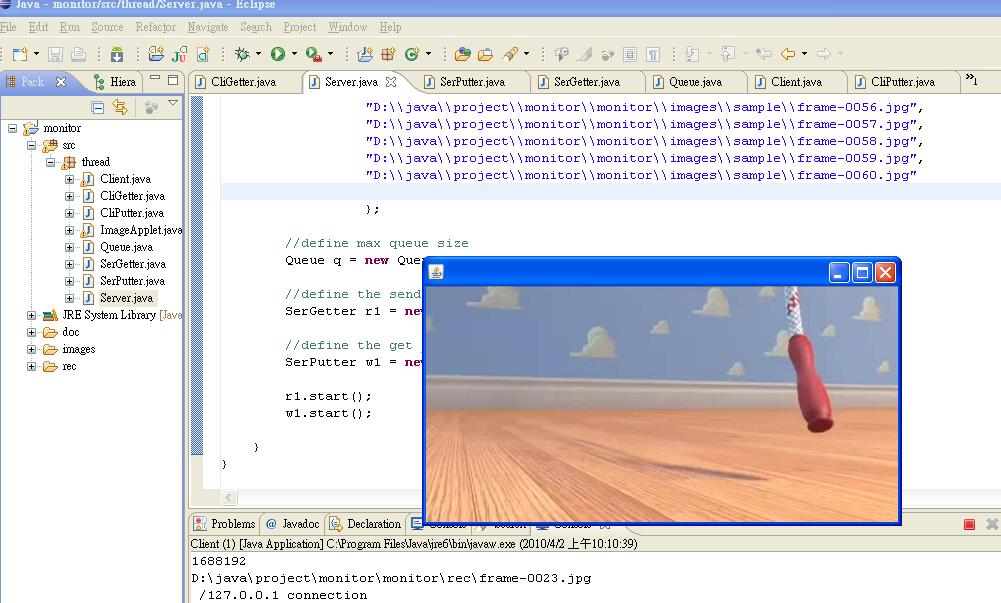
Pic Ref: http://www.freesharewaredepot.com/productpages/moyea-web-download-039249.asp Remote Web Player. Language : java Library : java -> socket (one 2 one) no application multi login java -> applet (display layout) Design flow : we separate two major parts for our "Server" and "Client". 1.Server part : we try to emulation the "webcam captured frames". (constrain : frame/2(s) ) if you would to know how to control the webcam in java, you can reference in http://www.javaworld.com.tw/jute/post/view?bid=5&id=266811 http://ltu164.ltu.edu/itseng/version.htm PS: In current case, we define our captured frames are already exist. and we use the "thread delay" function to emulate it - ("webcam captured"). you can use the "YouTube converter" to capture slide frames, that can convert "media stream" into "frames". http://benderconverter.com/ 2.Client part : Display 3.Queue : synchronous, lock ... that can handle multi clock domain and latency.

execution result :

download : http://sites.google.com/site/funningboy/java-1/monitor.rar?attredirects=0&d=1

2010年3月28日 星期日

2010年2月22日 星期一

Game for Snake

  1. 想當初在高中時代紅極一時的3310遊戲 "貪食蛇",堪稱是手機遊戲的先驅呢.話不多說,來介紹一下 "Snake" 設計架構.
  2. 主要分成兩大部分 1. Core,為我們的Data Base,計算每個Snake Node的X,Y座標. 2. Display為GUI的圖形介面(Layout). 下圖我們用最簡單的範例來講解Core的部分,(X,Y)為在圖表上X,Y的座標,Snake上的每個Node用structure的方式記錄每個Node所在的位置跟方向,假設下一步為向左的方向,等下個time strobe時 update每個Node. 經過update之後可以看到我們更改了Node內部的X,Y座標.跟Direction.等下個time strobe來決定Direction . 依此類推可以得到下一次每個Node的X,y座標. Display的部分就比較簡單了,用Array的方是依序填入每個[i][j]值,在導入Java的Display API.最後在設定Strobe的速度,food的位置,record,wall.... 執行結果. 程式碼下載 http://sites.google.com/site/funningboy/perl_code/Snake.java?attredirects=0&d=1 執行檔下載 http://sites.google.com/site/funningboy/perl_code/Snake.jar?attredirects=0&d=1