2021年5月14日 星期五

margin (融資/券)


「融資」是指投資人向券商借錢買股,自備4成現金,券商借你6成

簡單來說:「融資」是指投資人向券商借錢並支付利息,購買股票的意思,假設1檔股價100元的股票,買進須支付100*1,000(股)=10萬元的現金,但如果是以「融資買進」的話,就只要支付4萬元(4成),等於剩下的6萬元(6成)是向券商借的,因此以4萬元操作10萬元的部位,槓桿就是2.5倍(10/4=2.5)。


買進股票時,「融資維持率」=166%
若股價下跌使維持率<130%,需要補錢
再來就是「融資維持率」,想當然,把錢借出去的那一方,也就是券商,一定會盡可能把借出風險降低最低,所以也就有了「融資維持率」的保護機制(保護券商)。

延續上面的案例,以4萬元購買10萬元的股票,買進後融資維持率為166%,算法為10萬/6萬*100%=166%,就是「股票現值/融資金額」,所以當股價跌,現值也就跟著跌,當股價跌到融資維持率「小於」130%時,券商就會發出「融資追繳令」要求客戶「補錢」。

以股價100元的股票來說,股價跌到78元時會被發融資追繳(7萬8,000/6萬*100%=130%)所以簡化計算,你融資買進股價的當下,「股價*0.78」=「融資追繳價格」,這樣算比較簡單,

2014年11月12日 星期三

django + scrapy + celery + redis +

# setup virtual env
mkdir test
cd test
virtualenv .env
source .env/bin/activate

# install scrapy
pip uninstall lxml
STATIC_DEPS=true pip install -U lxml
pip install scrapy
pip install service_identity
# install mongodb
brew install mongodb --with-openssl
pip install pymongo
pip install mongoengine

#install celery
port install openssl  
pip install celery
pip install celery-with-mongodb

#install django

# install 3rd part libs
pip install pandas
pip install numpy
pip install zipline
port install cython
port install TA-Lib
easy_install TA-Lib

# install supervisor
pip install supervisor

# explore $PATH
.bash_profile
export PATH=".env/bin:/Users/seanchen/anaconda/bin:/opt/local/bin:/opt/local/sbin:/usr/local/bin:/usr/local/sbin:/usr/bin:/usr/sbin:$PATH"
export PATH="$PATH:/Users/seanchen/tool/mongodb/mongodb-osx-x86_64-2.6.4/bin:/Users/seanchen/prj/talib/src/ta-lib/bin"

export LD_LIBRARY_PATH=".env/lib:/usr/local/lib:$LD_LIBRARY_PATH" 

export C_FORCE_ROOT=true

2014年6月10日 星期二

remoteLED


  • remote LED
    • Server
      • raspberry pi control LED on/off
      • control GPIO pin 16, 18 to turn on/off led
    • client 
      • android phone
      • send remote control command to Server
  • prj path
    • https://github.com/funningboy/remoteLED

2014年2月9日 星期日

raspberry pi + microcontroller


  • RAM size 256/512 
    • http://openenergymonitor.blogspot.tw/2013/10/raspberry-pi-new-type-of-ram.html
  • FTDI USB 2 UART adaptor (JTAG) shared with GPIO
    • http://www.ftdichip.com/Products/Modules/RPi.htm
    • FT232 JTAG
      • https://github.com/progranism/FT232R-JTAG
      • https://github.com/dwelch67/raspberrypi/tree/master/armjtag
  • openOCD
    • JTAG driver
    • USB or the Parallel Printer Port (USB to rs232)
    • arm instruction disassembly
    • http://visualgdb.com/tutorials/arm/openocd/
    • http://openenergymonitor.blogspot.tw/2013/10/raspberry-pi-new-type-of-ram.html
  • mount JTAG with GDB(Eclipse)
    • http://www.ethernut.de/en/tools/eclipse/confdebug.html
  • convert arm assembly to c
    • Hex-Rays
    • https://www.hex-rays.com/products/decompiler/compare_arm0.shtml
  • bootloader

  • adafruit (extend hardware models,such as motor, led, mcu)
    • GPIO export
    • http://www.adafruit.com/
    • http://learn.adafruit.com/category/learn-raspberry-pi


  • 開發板教學
    • http://ruten-proteus.blogspot.tw/

xbus UVM example

purpose

a sample bus UVM/SV verification env that contains direct pattern, random pattern, trx replay pattern

pattern definition

  1. direct pattern : normal read/write test, like read after write test, the expected and answer had already known
  2. random pattern : random test based on it's constrain rule set
  3. trx replay pattern : replay trx via DPI interface supported

how to run it?

1.you can check our testsuites first, we provide three kinds of test at path ./sv/pat
1.1. for direct pattern +UVM_TESTNAME=test_xbus_normal_rw_seq_lib
1.2. for random pattern +UVM_TESTNAME=test_xbus_random_rw_seq_lib
1.3. for trx replay pattern +UVM_TESTNAME=test_xbus_adaptor_seq_lib
2.setup irun env please make sure your irun version is > 12.x
3.% irun -f run.f

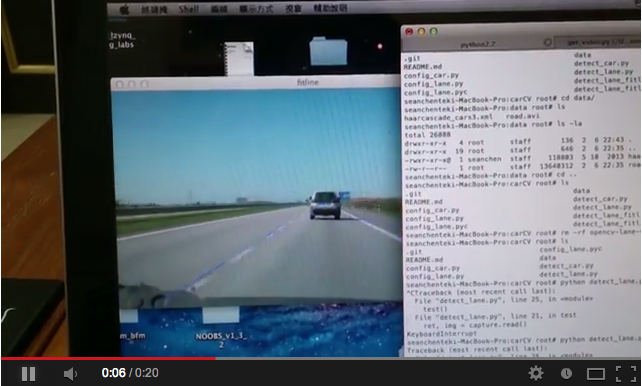
carCV

purpose

car and lane detection example
ScreenShot

method

-lane detection
  • houghlines
  • houghlinesP
  • fitlines
-car detection
  • haar cascades

how to run it?

step1. get video source %python get_video.py
step2. lane detection %python detect_lane.py
step3. car detection %python detect_car.py
Ref

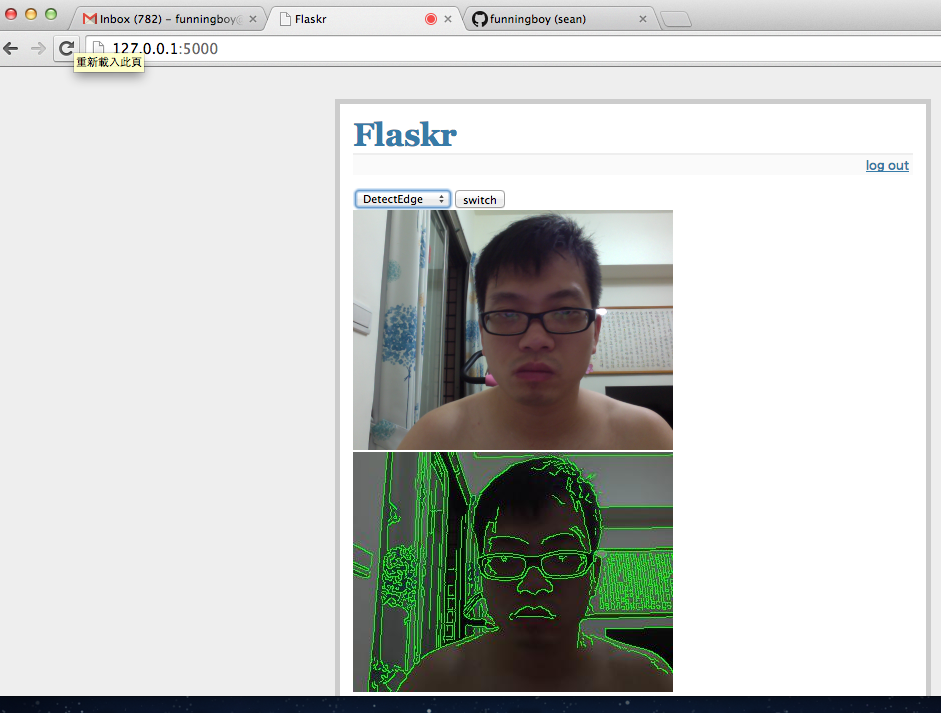
remote openCV with raspberry pi


this is an example about how to use remote object detection based on openCV and zeromq framework.

requirements

  • opencv(python) as cv(opencv) and cv2(numpy)
  • zeromq(python)
  • gevent(light weight switch)
  • knowledge about img process
  • profile, logging each stage mem and cpu time

method

  • Server
    • capture img
    • send img to clinet
    • wait for next command from client
    • update status by new command
  • Client
    • receive img
    • run all detection
    • build up a new command based on detection results

detections

  • face detect
  • circle detect
  • line detect
  • find attribute obj

how to run it?

  • python poll_camera.py (using cv to capture/show img via remote protocol)
  • python poll_camera2.py (using cv2 to capture/show img ...)
  • python poll_thread_run2.py (using cv2 to run all thread detection based on CPU num)
  • python poll_series_run2.py (using cv2 to run all series detection ...)

2013年12月1日 星期日

raspberry pi projects case study

1.  airplay remote audio player
http://gsyan888.blogspot.tw/2013/04/raspberry-pi-shairport-airplay-receiver.html

1.1 implement
http://www.instructables.com/id/raspbAIRy-the-RaspberryPi-based-Airplay-speaker/step3/Installation/

2 wifi adaptor
http://learn.adafruit.com/adafruits-raspberry-pi-lesson-3-network-setup/overview

3. game player
http://pimame.org/

4. media center by xbmc + navi = free movie + airplay media
http://www.instructables.com/id/How-to-Make-a-Raspberry-Pi-Media-Panel-fka-Digita/step2/Order-an-LCD-Controller-Board/
http://www.instructables.com/id/XBMC-Media-Center-with-Raspberry-Pi/
https://www.youtube.com/watch?v=rjcu3eYvlMY

5. microcontroller i2c python
http://www.instructables.com/id/Raspberry-Pi-I2C-Python/
http://learn.adafruit.com/adafruits-raspberry-pi-lesson-4-gpio-setup/configuring-i2c

6. microcontroller gpio
http://www.instructables.com/id/Web-Control-of-Raspberry-Pi-GPIO/

7. small web server
http://www.instructables.com/id/Raspberry-Pi-Web-Server/step5/SSH-Login/

8.Running Minecraft on a Raspberry Pi
http://learn.adafruit.com/running-minecraft-on-a-raspberry-pi

9. IDE debug
http://learn.adafruit.com/webide/installation

10 ATX power controller
http://www.raspberrypi.org/phpBB3/viewtopic.php?f=40&t=59919

2013年11月18日 星期一

python microcontroller case study

arm raspberrypi
http://www.raspberrypi.org/wp-content/uploads/2012/02/BCM2835-ARM-Peripherals.pdf

pymcu
http://www.pymcu.com/index.html

python microcontroller
http://www.kickstarter.com/projects/214379695/micro-python-python-for-microcontrollers

real time warning message broadcast system
bluetooth microphone
android usb


brain wave monitor

brain wave product 

bike LED 風火輪

風阻訓練台

arduino (openhardware)

openhardware

beagleboard source code


benchmark arm vs x86

power profile

bike fit

bike fit calculate

2013年10月14日 星期一

llvmpy = JIT python via llvm keynotes

  • llvmpy
    • a jit python interpreter via llvm
    • a  wrapper interface between llvm c/c++ function calls and python interface
  • flow
    • wrapper c/c++ code to shared lib, such as pass, target, VM...
    • explore the shared lib to python import path
    • import it
  • example
  • original c/c++ code
    #include "dpi.h"
    
    /* c_add */
    int
    c_add(int a, int b) {
      return a+b;
    }
    
    wrapper it via c/c++ python extend
    #include <Python/Python.h>
    #include <numpy/arrayobject.h>
    #include <stdio.h>
    #include <stdlib.h>
    #include "dpi.h"
    
    /* wrapper add, ref count definition */
    static PyObject *
    dpi_add_wrapper(PyObject *self, PyObject *args)
    {
      int a, b, c;
    
      // parse arguments
      if (!PyArg_ParseTuple(args, "ii", &a, &b)) {
        return NULL;
      }
    
      // run the actual function
      c = c_add(a, b);
    
      // build the result to a Python object.
      return Py_BuildValue("i", c);
    }
    
    /* register methods */
    static PyMethodDef DPIMethods[] =
    {
          {"dpi_add", dpi_add_wrapper, METH_VARARGS, "Calculate the sum of two integers."},
          {NULL, NULL, 0, NULL}
    };
    
    
    register to python search path
    from distutils.core import setup, Extension
    
    
    # ref : http://docs.python.org/2/extending/building.html
    # the c++ extension module
    extension_mod = Extension("dpi", ["moduledpi.c", "dpi.c"], include_dirs=['/var/root/anaconda/lib/python2.7/site-packages/numpy/core/include'],
    library_dirs=['/var/root/anaconda/lib/python2.7/site-packages/numpy/core/lib', '/var/root/anaconda/lib/python2.7/site-packages/numpy/lib'])
    
    setup(name = "dpi", ext_modules=[extension_mod])
    
    run it
    >>> python
    >>> import dpi
    >>> dpi.dpi_add(1,2)
    

2013年10月6日 星期日

how many ways to import c/c++ to python


  • import your c/c++ to python
  • way
    • cython
    • pyobject python c api (python extension with C)
    • swing
    • ctypes
  • ref
    • http://realmike.org/blog/2012/07/05/supercharging-c-code-with-embedded-python/
    • https://intermediate-and-advanced-software-carpentry.readthedocs.org/en/latest/c++-wrapping.html
    • http://realmike.org/blog/2012/07/08/embedding-python-tutorial-part-1/
    • http://www.tutorialspoint.com/python/python_further_extensions.htm
    • https://mail.python.org/pipermail/capi-sig/2009-May/000256.html
    • http://docs.scipy.org/doc/numpy/user/c-info.how-to-extend.html
    • http://dan.iel.fm/posts/python-c-extensions/
    • http://web.mit.edu/course/6/6.863/OldFiles/python/old/numpy-1.0.1/numpy/core/src/arraymethods.c
    • http://scipy-lectures.github.io/advanced/interfacing_with_c/interfacing_with_c.html#introduction

2013年9月27日 星期五

fast debug key notes

these are my tips for fast debug.

  • set breakpoint when the assertion was happened
    • like GDB methodology 
      • forward, backward, force signal, release signal
    • tip
      • forcing the error signal value to your expect signal value when the simulation assertion was happened. if the signal was forced, then continuous go through it without rerun again. that can save the interrater running  times
  • dump the error time window waveform without whole simulation time dump
    • tip
      • using the interactive method to dump waveform. 
        • 1. find the error happened time
        • 2. set breakpoint 
        • 3. jumping the previous time window via backward breakpoint
        • 4. open interactive dump waveform command
        • 5. start dumping until the next breakpoint was happened
  • using assertion 
  • using verification IPs
    • sub IP test (selftest)
      • functional test, coverage test, Direct/Random pattern test
    • sub system test (sub system test)
      • protocol test, transaction path test, performance test
    • whole system test (H/S test)
      • OS boot, H/S correlation test

2013年9月25日 星期三

python2.7 + openCV + myHDL


  • main purpose
    • using openCV to estimate how may hardware cycles in our archicture
  • requirement
    • python2.7.3
    • opencv2.4.2
    • numpy
  • exercise
    • rotate 0, 90, 180, 270 degree
    • image mask
    • image fetch
    • watermaker
  • project:
    • https://github.com/funningboy/openCV_myHDL/tree/master/opencv
    • ref
    • http://docs.opencv.org/doc/tutorials/calib3d/camera_calibration/camera_calibration.html
    • https://github.com/FalkorSystems/DeFisheye/blob/master/README.md
    • http://cg2010studio.wordpress.com/2012/01/03/opencv-%E6%A8%A1%E6%93%AC%E9%AD%9A%E7%9C%BC%E9%8F%A1%E9%A0%AD-simulate-fisheye-lens/
    • http://stackoverflow.com/questions/2477774/correcting-fisheye-distortion-programmatically

2013年9月22日 星期日

xilinx HLS for OpenCV example


refs:
http://xilinx.eetrend.com/files-eetrend-xilinx/download/201305/3986-8011-xapp1167.pdf

2013年9月21日 星期六

MyHDL slides

coverage group based on different bins

bus interface coverage catagology

classification

  • functional coverage bins
    • address rage bins
    • burst len bins
    • read/write bins
    • burst type bins
    • byten enable bins
    • cross coverage 
      • read trx
        • address, burst, read, ....
      • write trx
        • address, burst, write, ....
  • performance coverage bins
    • standard/normal bins
    • out standard bins
    • below standard bins
    • cross coverage
      • read trx
        • standard
      • write trx
        • standard
  • toggle coverage bins
    • 0 -> 1 
    • 1 -> 0
    • cross coverage
      • read trx
        • 0 -> 1 -> 0
      • write trx
        • 0 -> 1 -> 0
  • FSM coverage bins
    • default pass
  • protocol coverage bins
    • atomic bins
    • out of order bins
    • divide/conquer bins
    • address mapping table bins span tree
    • hit rate bins (cache coherence)


2013年9月14日 星期六

python finance model Quant-economic

Python finance model example

  • http://quant-econ.net/_static/pdfs/quant-econ.pdf?utm_source=Python+Weekly+Newsletter&utm_campaign=8e17b3ce66-Python_Weekly_Issue_104_September_12_2013&utm_medium=email&utm_term=0_9e26887fc5-8e17b3ce66-312683741
  • https://github.com/funningboy/quant-econ


requirements
  • numpy
  • pandas
  • scipy
  • matplotlib
  • pylab


Cadence SimVision UVM/SystemVerilog debugger

transaction level debug via SimVision....

  • transaction waveform info/pin level waveform info 
  • transaction database info
  • UVM phase sequence info
  • assertion info
  • coverage rate
    • functional
    • fsm
    • code
    • assertion
    • performance 
  • debug step by step, like gdb forward, backward, stop point, value dump....
  • unknown signal trace back
  • vif (virtual interface), Driver 


2013年8月21日 星期三

verification IP support lists


  • http://syswip.com/
    • support env : systemverilog
      • IP lists
        • AMBA
        • CAN
        • IO(I2C)
        • ...
  • http://www.smart-dv.com/products.html
    • support env :
      • IP lists
        • AMBA
        • IO(I2C)
  • http://www.truechip.net/
    • support env : UVM/OVM/SystemC
    • IP lists
      • USB3.0
      • AMBA
      • M-PHY
      • IO(I2C)
  • http://testandverification.com/
    • support env UVM/OVM
    • IP lists
      • USB3.0
      • AMBA
      • IO(I2S, I2C)
  • http://www.avery-design.com/
    • support env UVM/OVM
    • IP lists
      • PCI
      • DDR
      • SATA